

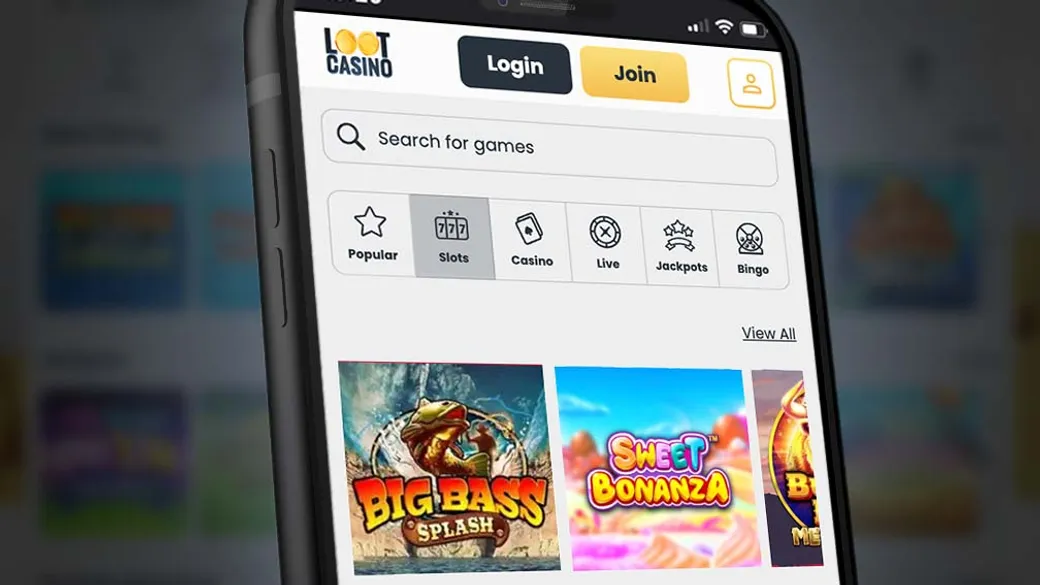
Playing At Loot Casino From Your Phone
We built our mobile experience so that everything available on the desktop site works just as well in your hand. Whether you land on us through a browser on your iPhone or install our Android app, the game library, the daily promotions and your account tools all carry across without any cut-down version or missing features. This page walks through exactly how mobile play works with us, what our Android app offers, how iOS and desktop browser access compares, and what to expect from account management, deposits and verification on a smaller screen.
How We Approach Mobile At Loot Casino
Mobile is not an afterthought for us. Given that our slot library runs to 3,600+ titles across roughly 20 providers, a big part of making that usable on mobile is speed and layout, not just having a shrunk-down website. Our platform is built to load games quickly on a phone connection and to keep navigation simple, so scrolling through categories or jumping into a title does not feel clunky compared with a desktop session.
Our Native Android App
We offer a genuine native Android app rather than just a shortcut to the mobile site. It is downloaded directly from our website rather than through the Google Play Store, which is standard practice for gambling apps in the UK, since Google’s own store policies restrict real-money casino apps in most markets. The app requires Android 7.0 or higher, which covers the large majority of Android phones still in regular use.
Once installed, the app carries the full game catalogue and every promotion running on the site, including the Daily Wheel spin. Key features of the Android app include:
- Face ID and fingerprint login, so you do not need to retype your password every session
- The same full slot and live casino range as the desktop site, optimised for faster loading
- Full access to promotions including the Daily Wheel, Mega Reel and other reel-based offers
- The ability to deposit, withdraw and upload verification documents directly from the app
- A QR-code handoff feature, letting desktop users complete identity checks by scanning a code and finishing the process on their phone camera
That QR handoff is a genuinely practical touch: if you are sat at a laptop and need to submit a photo ID or a selfie for verification, taking a decent photo with a laptop webcam is often worse than with a phone camera. Scanning the code and finishing on your phone tends to produce cleaner, more readable documents, which can help verification move faster.
Getting The Android App Installed
Installing an app from outside the Google Play Store means your phone will usually ask you to confirm that you trust the source, since Android blocks installs from unknown sources by default as a security measure. This is normal for licensed gambling apps in the UK and is not a sign of anything wrong with the file itself. In practice, downloading and installing our app follows a short, familiar sequence:
- Visit our site on your Android phone’s browser and find the app download link
- Download the APK file when prompted
- Allow installation from this source if your phone asks for that permission
- Open the installed app and log in with your existing account, or register a new one
- Enable Face ID or fingerprint login if your device supports it, so future sessions are quicker
Playing On iPhone And iOS
We do not currently offer a dedicated iOS app through the App Store. Instead, iPhone and iPad players use our fully optimised mobile browser site, which mirrors the desktop version in terms of games, promotions and account features. Apple’s App Store guidelines are notably stricter than Google’s when it comes to real-money gambling apps, which is why browser-based play remains the standard route for casinos on iOS in the UK market.
In practice, this means you open Safari or Chrome on your iPhone, go to our site, and log in exactly as you would on a laptop. There is no separate download step, no app storage taking up space on your device, and updates happen automatically since you are always loading the current version of the site. Many players actually prefer this, since there is nothing to keep updated manually and no compatibility concerns tied to iOS version numbers.
Bookmarking For A Near-App Experience
A useful trick on iOS is adding our site to your home screen through the Safari share menu. This creates an icon that opens directly into a browser tab without the usual address bar clutter, giving a look and feel close to a native app while still running through the browser. It is a small step but one that makes returning to your account and checking the Daily Wheel or your open promotions much quicker than typing the URL each time.
The Responsive Mobile Site On Any Device
Beyond the Android app and iOS browser play, our mobile web platform is fully responsive across both Android and iOS, meaning the layout automatically adjusts to your screen size rather than forcing you to pinch and zoom around a desktop-shaped page. This same responsive site also works on tablets, and it is the version desktop users fall back to if they choose not to install the Android app. The practical benefit is consistency: whichever device you pick up, the menu structure, game categories and account sections sit in roughly the same place.
| Platform | Access method | Notable features |
|---|---|---|
| Android | Native app (downloaded from our site) | Face ID/fingerprint login, QR verification handoff, offline install |
| iOS | Browser (Safari/Chrome) | Full responsive site, home-screen bookmarking, no download required |
| Desktop | Browser | Full site, QR handoff available for mobile-based verification |
Managing Your Account On Mobile
Signing in and registering work the same way on mobile as on desktop, and full details on creating and accessing your account sit on our login page. From your phone or the Android app, you can check your balance, review your recent activity, and manage responsible gambling tools such as deposit limits or take-a-break periods without needing to switch to a computer. Given that account verification (KYC) requires photo ID, a selfie and proof of address, having a capable camera in your pocket rather than relying on a webcam genuinely speeds up that process for a lot of players.
Deposits And Withdrawals From Your Phone
Mobile deposits and withdrawals run through the same payment methods available on desktop, including debit cards, PayPal, Pay By Mobile, Paysafecard, Skrill and Neteller, all detailed on our payments page. Deposits through these methods are instant on mobile just as they are on desktop, since the transaction itself runs through the same payment processor regardless of screen size. Pay By Mobile in particular is worth flagging for phone users specifically, since it charges deposits directly to your phone bill rather than requiring you to enter card details at all, which some players find more convenient when depositing on the move.
Choosing Games And Playing On A Smaller Screen
Our lobby is organised into curated categories such as Gone Fishing, Jackpots, Cosmic Adventure, Tales of Egypt, Mystical & Magical, Fluffy & Friends, Megaways and Slingo, and this same category structure carries over to mobile, with a search function to jump straight to a specific title. On a phone screen, filtering by category or using search tends to be far quicker than scrolling through the entire library, particularly with a range as large as ours. Our full online slots range and live casino tables are both playable on mobile, with live dealer streams running smoothly on a standard mobile data or wifi connection thanks to modern video compression, though a stable connection does help avoid buffering during a live blackjack or roulette hand.
A few practical points make mobile slot and live sessions smoother:
- Playing on wifi rather than mobile data reduces the chance of buffering during live dealer streams
- Rotating your phone to landscape mode on some slot titles gives a larger view of the reels and bonus features
- Closing other apps running in the background frees up memory, which helps games with heavier graphics load faster
- Keeping the app or browser updated to its latest version avoids compatibility issues on older phone software
Notifications, The Daily Wheel And Staying Across Promotions On The Go
Because promotions like the Daily Wheel are tied to logging in once every day, mobile access genuinely matters for actually using them, since checking a quick spin from your phone during a commute is far more realistic than sitting down at a desktop every day. The Android app in particular is built around this kind of daily habit, keeping the wheel, trophies and any live tournament activity like Fluffy Fridays accessible in a couple of taps rather than a full page load. Full terms on our welcome offer and ongoing promotions sit on our bonuses page, but the short version for mobile purposes is that none of the offer mechanics change depending on which device you use to claim them.
Trophies And Login Streaks On Mobile
Our trophy system rewards things like reaching 100 spins or maintaining a login streak, and streaks specifically reward the habit of returning regularly, which is naturally easier to sustain when your casino account is one tap away on your phone rather than requiring you to boot up a computer. This is one of the clearer practical advantages of having a proper native app rather than only a browser shortcut, since app icons sit on your home screen alongside everything else you check daily.
A Note On Playing Responsibly On Mobile
Mobile access makes it easier to play in more places and at more times of day, which is exactly why the tools to manage that access matter just as much on a phone as on a desktop. Deposit limits, take-a-break periods and self-exclusion set through your account apply across the whole session regardless of which device you are using, and these limits also apply across the wider operator network of sister sites, not just this one account. We are licensed and regulated by both the UK Gambling Commission and the Alderney Gambling Control Commission, and our platform integrates with GAMSTOP for players who choose to self-exclude from UK-licensed gambling entirely. Full details on setting limits and accessing support tools are available on our responsible gaming page. Gambling should stay a form of entertainment rather than something relied on for income, and mobile convenience is not a reason to loosen your own limits, it is simply a reason to make sure those limits are set sensibly from the start.
Loot Casino was built on the Jumpman Gaming platform with mobile play in mind from the outset, not bolted on afterwards, and that shows in how consistently the same features, games and promotions carry across Android, iOS and desktop. If you are ready to try it from your phone, head to Loot Casino to register or log in, and you will be spinning the Daily Wheel or browsing our slot library within a few minutes, wherever you happen to be. Play must be 18 plus, and we encourage every player to make use of the account tools available to keep sessions enjoyable and within personal limits.